
Download the Free DoView Legacy App

“Sometimes elegance and simplicity define use”
— Gartner Cool Vendor Award for the legacy DoView app
Quick Overview
Instructions on installing the formerly paid DoView app (Windows), now a free download. A set of two-minute help videos on using DoView’s features. A description of some of the key features of DoView. Details of what Gartner Research (the global research and advisory firm that evaluates apps and technology) said when it awarded DoView app Gartner Cool Vendor status.
Important: Don’t run the help video when installing
When installing the DoView app, you will be asked if you want to watch a video about using it. Don’t run the video when installing DoView, because it can interfere with installation. If you accidentally do so, no big deal, simply restart the installation process.
Get a permanent copy of fully featured DoView Pro. Once you have installed DoView, open it in the trial version, click on File > Registration > and put in the following registration serial number.
Put in your name and the
Registration Serial Number
R1EH-MBKY-X3WB-4NAC-YN91
Opens in a new Tab. It may take a minute or two to download.
Short help videos for DoView legacy app
Overview of what DoView app is for (2 min).
Making clones in DoView app (1.5 min).
How to format a box in DoView app (2 min).
Making a drill-down page in DoView app (2 min).
DoView’s features
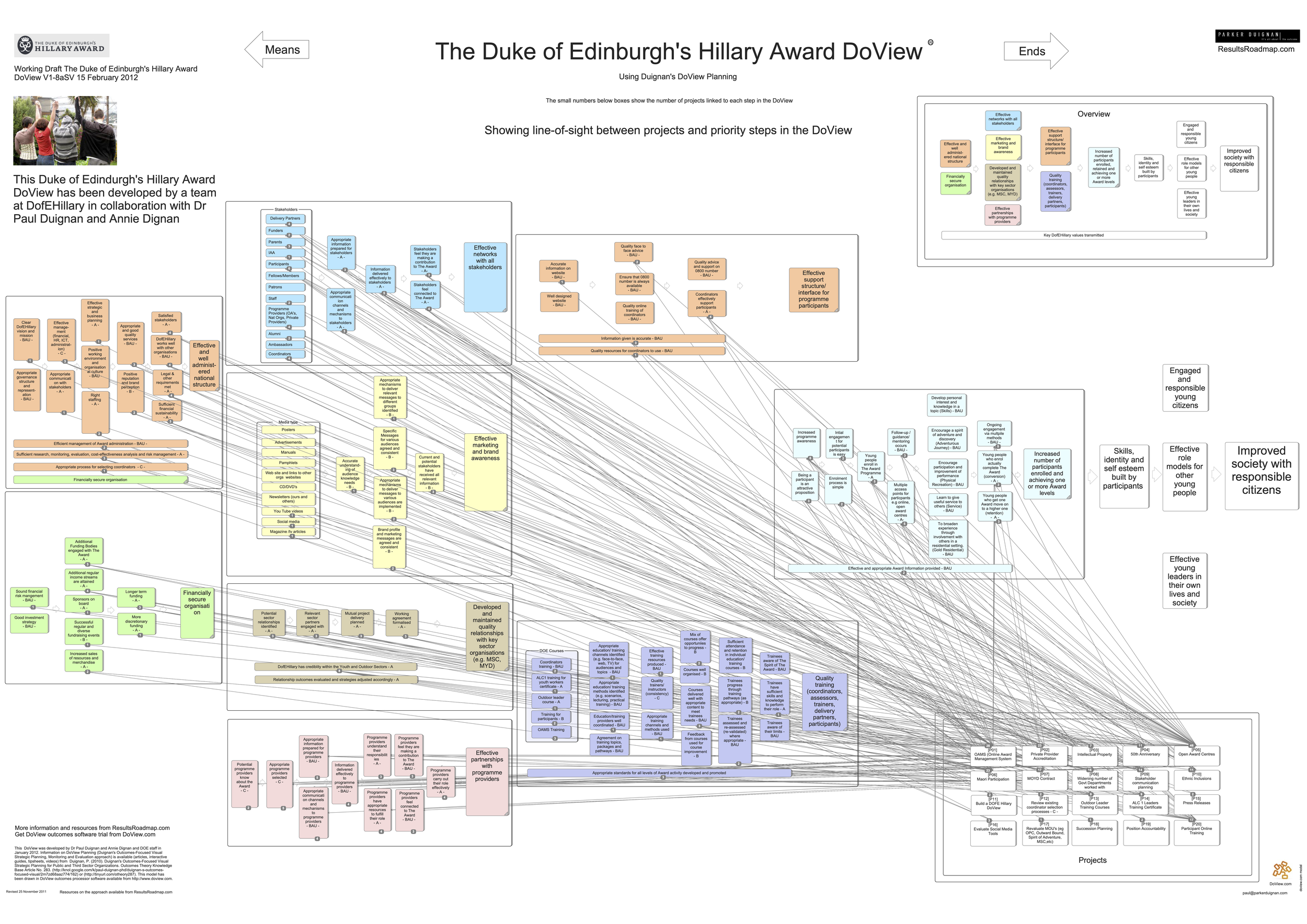
DoView legacy app (Windows)—formerly a paid app, now provided free for use in DoView Planning—is designed for undertaking DoView Planning and includes features that speed up your outcomes and planning workflow. You can do most DoView Planning in PowerPoint or Google Slides (using a PowerPoint version of a DoView diagram built with the AI DoView Drawing Prompt or downloaded from this site. However, at the moment, DoView app’s unique features are particularly useful when doing one aspect of DoView Planning at scale–DoView Visual Alignment. This is where you visually align your activities/projects with priority outcomes. Below is an example. The DoView app lets you easily make links between boxes on different subpages of a DoView and represent those links with lines, but also in other ways.
Anyone is free to build the features of the DoView app into any app, platform or system (just please acknowledge that you are doing that and call what you are producing DoViews). If you want a hand doing this, get in touch.
The key features of the DoView app are the following:
Presentation mode is similar to editing mode. In the DoView app, presentation and editing modes look and feel almost identical. This is based on a strategy psychology concept that when building a strategy/outcomes diagram, users should feel that the model being constructed in whatever app they are using is being extracted seamlessly from the mental models in the heads of the people in the room. Those building such a model also need to feel comfortable amending it in any way at any point. A distinctly different, highly technical editing mode can discourage this by ‘breaking’ participants’ sense that the diagram is evolving in the course of the ongoing dialog amongst those in the room.
Supports dividing the diagram into drill-downable subpages. The DoView app has features that encourage the user to split a DoView diagram into a series of drill-downable subpages rather than just having one large, unwieldy model. The DoView subpages size is optimized for portability across paper, tablets, computers and when data projected. The resulting modular DoView diagrams result in a low cognitive load, making them much easier for users to understand.
Represents links between boxes in multiple ways. Given that it is easier for users to understand a multipage strategy/outcomes rather than a larger single-page diagram, the issue of how to show links between boxes within multipage diagrams needs to be dealt with. The method used in typical drawing software, of simply representing a link as a drawn line, fails when you want to depict a link between two boxes on separate pages in a multipage model. To deal with this, the DoView app stores the relationships between boxes in its database, which means that it can then represent links in multiple ways—as either drawn lines or as symbols showing that there is a link between boxes on different pages. The app also allows users to use a right mouse click to see a list of the boxes that are linked to any box that they have highlighted.
Clones of elements. DoView allows boxes and other elements to be cloned. This means that if you change the name of one of these elements in one place, the change is reflected in other places where its clone may appear. In addition, being able to clone boxes within the DoView is useful when you develop a multipage model and want the same element to appear on different subpages.
Designed for practical visualization. The DoView app is designed for practical real-time visualization during meetings. This facilitates the use of DoView diagrams as shared thinking tools that people can work with in real-time during meetings.
Files can be saved as XML. DoView app files can be saved in their native format or in XML (a generic format). This allows the possibility of DoView models being moved back and forth between different apps where each of the apps can read and save in XML format.
DoView files edited by different people can be merged. The DoView app can merge files. This means that different people can work on parts of a DoView file that can then be merged back into another version of the file and the changes that have been made can be incorporated in that other version.

Gartner Research Report on DoView Cool Vendor Award
The DoView app was recognized by Gartner as a Cool Vendor. This is a distinction given to only a handful of companies worldwide each year. This award highlights software that stands out as innovative, impactful, and forward-looking, giving the app strong independent credibility from one of the world’s most respected technology analysts.
When Gartner awarded DoView Cool Vendor status, they praised the app as an easy-to-use and conceptually innovative tool that helps people think about planning with an outcomes focus. They also noted that while the approach remains powerful, the technology reflects an earlier generation. This is why the DoView app is now being made freely available, so as many people as possible can use it to explore the use of DoView Planning in all settings. Some quotes from the report are below.
‘Sometimes, simplicity and availability define elegance. DoView's innovating technology focuses on outcomes, which it does by defining the set of building blocks of all outcomes and showing how these relate to each other. Enterprisewide tools have existed for years to solve this problem and have suffered from both poor adoption and limited market penetration. DoView solves this problem by approaching the problem from the bottom up instead of the top down. It does so by inexpensively putting the solution in the hands of the person who needs it the most - the project manager (PM). Do View allows the PM to prepare a linked analysis (benefit or results chain) with a single piece of software . . .’
‘DoView should be of interest to IT and business leaders looking for cost-effective ways to execute project strategies and get improved outcomes. In theory, project managers are trained to think in terms of work breakdown structure, and decomposing and linking outcomes should be the most natural activity in the world. The truth is, however, that the Gantt chart focus of enterprisewide Project Portfolio Management tools has shifted from a natural orientation toward work breakdown structure to focus on tasks.
DoView offers an affordable way to start shifting the culture away from tasks to outcomes, and can serve as a way for IT to better communicate the work that is being done by agile teams.’